
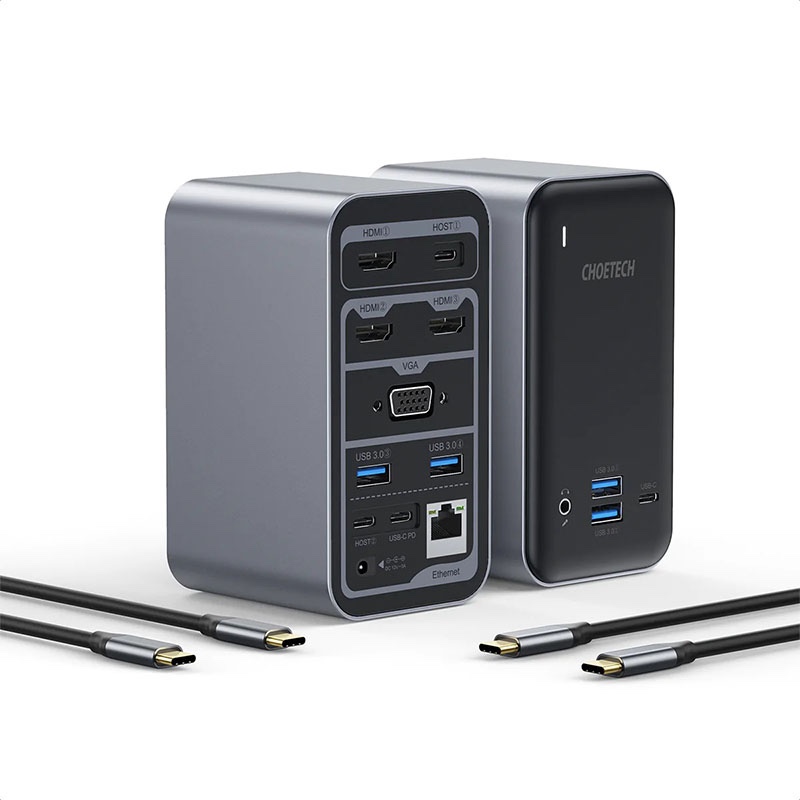
Modern workspaces often involve far more technology than a single laptop can comfortably support. A typical desk may include external monitors, keyboards, mice, storage drives, headphones, Ethernet connections, memory cards, smartphones, and other accessories. Managing all these devices individually can quickly create a tangled collection of cables and adapters. A 15 in 1 docking station offers a practical solution by bringing multiple connectivity options together in one centralized hub.
Whether you work from home, manage a professional office, create digital content, or regularly switch between devices, a well-designed docking station can simplify your setup. Instead of repeatedly connecting and disconnecting individual accessories, you can use one main connection to expand the capabilities of your computer.
What Is a 15 in 1 Docking Station?
A 15 in 1 docking station is a multifunctional connectivity device designed to provide numerous ports and interfaces through a single hub. Depending on the model, it may include USB ports, HDMI or DisplayPort connections, Ethernet, audio, memory card readers, USB-C, and power delivery support.
The exact combination of ports varies between products, so users should always check the specifications before purchasing. The “15 in 1” designation generally refers to the number of available functions or connection interfaces rather than a universal standard.
The main advantage is convenience. Instead of purchasing separate adapters for different devices, you can consolidate many connections into one workspace accessory.
Why One Hub Can Improve Your Workspace
A cluttered desk can make even a powerful computer setup feel inefficient. Multiple dongles and cables occupy valuable space and make it harder to quickly connect equipment. A 15 in 1 docking station can help create a more organized workstation by reducing the number of separate adapters required.
For professionals, this can make daily work smoother. You might connect a monitor for additional screen space, Ethernet for a stable network connection, USB peripherals for productivity, and external storage for file management. Once everything is connected to the docking station, connecting your laptop can become much simpler.
This is especially useful for people who move between home and office environments. Instead of carrying several adapters every day, you can leave the docking station connected to your desk accessories and use a single cable when you arrive.
Supporting Multiple Displays
One of the most useful features of many advanced docking stations is external display support. Additional monitors can make multitasking easier by allowing users to keep several applications visible simultaneously.
For example, a professional might use one display for email, another for spreadsheets, and a laptop screen for communication or research. Designers, programmers, analysts, and content creators can also benefit from a larger digital workspace.
However, display capabilities depend on the computer, operating system, graphics hardware, and docking station. Before buying, check the supported resolution, refresh rate, number of displays, and whether the device supports the desired display technology.
Connecting Essential USB Accessories
USB connectivity remains essential for modern workspaces. Keyboards, mice, webcams, microphones, printers, external drives, and other peripherals frequently rely on USB.
A 15 in 1 docking station can provide multiple USB connections in one convenient location. This makes it easier to keep frequently used accessories permanently connected instead of reaching behind a computer every time you need to plug something in.
Different USB ports may also offer different transfer speeds or power capabilities. Users who regularly transfer large files should pay attention to the specifications of each port rather than assuming every USB connection provides identical performance.
Fast and Convenient Network Connectivity
Wireless networking is convenient, but wired Ethernet can be valuable when stability and consistent performance matter. Video conferencing, large file transfers, cloud-based applications, gaming, and professional workflows can all benefit from a reliable wired connection.
A docking station with Ethernet allows compatible laptops and computers to access a wired network without requiring a separate network adapter. This can be particularly useful for offices where Ethernet connections are already available at workstations.
Before selecting a model, check the Ethernet standard and supported speeds to ensure that it meets your network requirements.
Power Delivery and Charging
Many modern docking stations support USB-C Power Delivery, allowing compatible computers to receive power through the docking station’s primary connection.
This can significantly reduce cable clutter. Rather than connecting your laptop separately to a charger and then attaching multiple accessories, a compatible setup may allow the docking station to handle both connectivity and charging.
Power requirements vary considerably between computers. A laptop designed for high-performance workloads may require substantially more power than a lightweight productivity machine. Always verify the docking station’s maximum power-delivery capability and your computer’s charging requirements.
Built-In Card Readers for Creative Work
Photographers, videographers, designers, and other creators often work with SD or microSD cards. A docking station with integrated card readers can make transferring media files much more convenient.
Instead of carrying a separate card reader, users can insert a compatible memory card directly into the docking station. This can save time when moving photos, videos, documents, or other files between removable storage and a computer.
Transfer performance still depends on the card, reader, computer, and connection interface, so professional users should examine the supported card standards and speeds.
Better Cable Management
One of the overlooked advantages of a multifunctional docking station is cable organization. A workstation can quickly become crowded when every peripheral requires its own adapter.
By positioning the docking station in a central location, users can route cables more neatly around the desk. The computer itself may only need one primary connection to access numerous peripherals.
A cleaner setup is not only visually appealing but can also make maintenance easier. When a device needs to be disconnected, users can identify the relevant cable without searching through a collection of adapters.
Choosing the Right Docking Station
Not every 15 in 1 docking station will be suitable for every computer. Compatibility should be the first consideration.
Check whether the docking station supports your laptop’s operating system and connection standard. Then review the ports you actually need. A device with fifteen functions may sound impressive, but unused ports do not provide much value if the connections you rely on are missing.
Display support, USB speed, Ethernet performance, charging capability, build quality, and warranty should also be considered. Professionals who depend on their workstation every day may want to prioritize reliability and thermal management over simply choosing the lowest-priced option.
A Practical Solution for Modern Productivity
The greatest benefit of a multifunctional hub is not simply the number of ports. It is the way those connections work together to create a more efficient workspace.
A laptop can remain portable while a desk becomes a fully equipped workstation. Monitors, storage devices, networking equipment, USB accessories, audio equipment, and other peripherals can remain connected to the hub. When it is time to leave, disconnecting one primary cable can make the laptop portable again.
This flexibility makes docking stations valuable for hybrid workers, students, business professionals, creators, and anyone who regularly connects multiple accessories to a computer.
Final Thoughts
A 15 in 1 docking station can transform a simple laptop setup into a comprehensive workspace by combining numerous connectivity options in one centralized device. From multiple displays and USB peripherals to Ethernet, storage accessories, charging, and memory cards, a capable docking station can reduce clutter while making everyday connections more convenient.
The key is choosing a model based on actual requirements rather than the port count alone. Carefully compare compatibility, display specifications, USB speeds, networking, power delivery, and the types of devices you plan to connect. With the right combination of features, a single docking station can become the central connection point for a clean, flexible, and productive workspace.